

Find out what internet speed you need to work from home and get 5 tips to make your internet faster for better work.
Working from home is now a global trend, giving us freedom and comfort but also the challenge of getting a good internet connection. Picking a cost-effective, efficient internet plan is key, showing our search for quality without paying too much.
This isn’t just about faster internet or better connection; it’s about adapting, making smart choices, and improving our lives. Together, we learn, grow, and focus on what’s important, dealing with challenges and celebrating wins with a positive and strong attitude.
These challenges shape us, motivate us, and bring out our best.
Article Breakdown
What Internet Speed Do I Need?
So… what you need for internet speed kinda depends on your job and what you like. Usually, 25 Mbps for downloading stuff and about 3 Mbps for uploading is cool for simple browsing and video chats. But, if you’re dealing with big files or video calling with a bunch of people at once, you might need faster internet.
| Activity | Recommended Internet Speed |
| Email checking, web browsing | 1-5 Mbps |
| Video calls, virtual meetings | 10-25 Mbps |
| Streaming HD content | 25 Mbps or higher |
| Online gaming | 15-40 Mbps |
| Large file transfers, cloud-based applications | 50 Mbps or higher |
Ookla’s report from early 2023 says the average download speed worldwide was around 110 Mbps, and upload speed was about 56 Mbps. That’s way more than what you need to work from home, showing just how much we rely on the internet these days.
These are just general tips, but it’s a good idea to ask your boss or internet company for any specific things you need for your job.
What influences your internet speed?
Different things can affect how fast your internet is when you work from home:
Type of internet plan subscribed to
Higher-speed plans offer faster, more stable connections.
Router placement
Position in a central location away from obstacles to improve speed.
Interference from devices
Microwaves, cordless phones, and baby monitors can disrupt Wi-Fi signals.
Age and condition of networking equipment
Outdated routers and modems can slow down connections.
Regularly monitoring these factors and taking steps to optimize them can help ensure a smoother remote work experience with reliable internet speeds.
Tools to check out and keep an eye on your internet speed
It is fact that when you work from home, having a good internet connection is super important. There are a bunch of tools out there to help you see how speedy your internet is.
- Speedtest.net: Simple, easy-to-use website for checking download and upload speeds
- Fast.com: Provides quick internet speed tests directly from Netflix’s servers.
- NetSpot: Offers detailed insights into network performance for advanced users.
- Check with your Internet Provider: All business Internet providers give you special web tools to find speeds.
Testing your connection regularly is wise. These websites let you track your network’s quality. If things seem slow, you know to look into fixes.
Enhancing Your Online Connectivity: 5 Effective Solutions
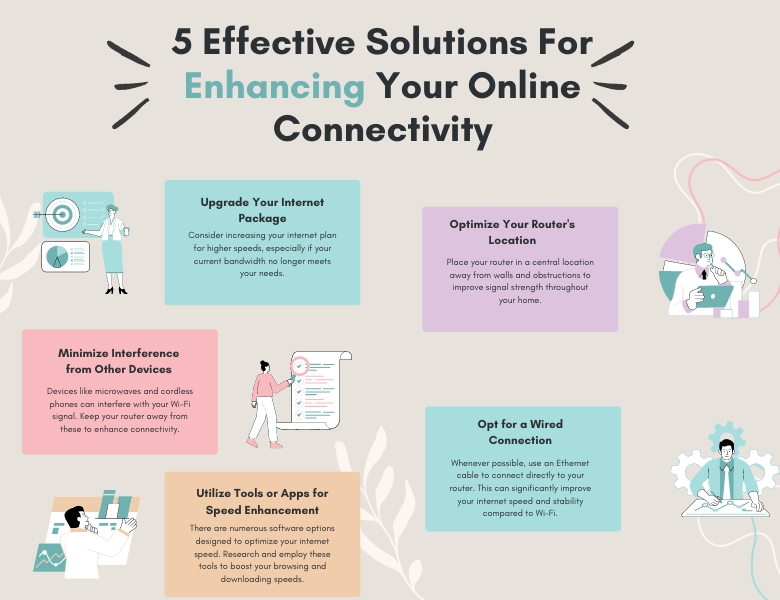
It is clear that a reliable internet connection is paramount. While limitations may exist due to your location and service plan, several strategies can optimize your online experience. This guide explores five practical approaches to improve your internet speed seamlessly.
1. Upgrade Your Internet Plan
Upgrading to a better internet plan can really speed things up. Consequently… these options offer quicker download and upload speeds for better video calls, fast file sharing, and smooth online tool usage. Internet providers have different plans for various needs and budgets. For this… It’s crucial to consider your work requirements and choose a plan that suits your online activities.
But, before you decide, look into what’s available where you live and carefully compare different plans. And… Getting a better plan not only boosts your work efficiency but also gives a better internet experience for every gadget at home.
2. Optimize Router Placement
The positioning of your router can significantly influence your internet speed. Opt for a central location within your home to ensure the signal reaches all areas as efficiently. And… This strategic placement can enhance coverage and speed, minimizing dead zones or weak signal areas. However, avoid placing your router near electronics or appliances that may cause interference, such as microwaves or cordless phones. These devices can disrupt the Wi-Fi signal, leading to slower speeds and potential connectivity issues.
Elevating your router off the ground and positioning its antennas vertically can also help maximize its range and strength. Additionally, keeping it away from walls or large objects can prevent signal blockage.
Experiment with different placements to find the optimal position for your router. Consequently… Small adjustments can make a big difference in improving your internet speed for seamless remote work productivity.
3. Minimize interference from other devices
Working from home? So… Boost your internet speed by cutting down on device interference. The more devices hooked up, the slower your Wi-Fi gets because they’re all gobbling up bandwidth. Switch off stuff you’re not using like phones, tablets, smart TVs, and those smart home devices to reduce the jam and stick to what you’re actually using. This can make your connection zippier for work stuff.
Also… think about tweaking your router settings to give more internet juice to your work devices. A lot of routers let you pick which devices or apps get top speed, making sure your work tasks aren’t lagging. Check if your router can do this and set it up to make your home office run smoother.
4. Use a wired connection instead of Wi-Fi
Opting for a wired connection over Wi-Fi can ensure a stable internet connection while working from home. Because… Wired connections offer better reliability, ensuring a constant signal without the interference you might get from other devices or barriers in your house. For faster internet, just use an Ethernet cable to connect your computer directly to your router. And… This will help make video calls, file downloads, or streaming for work much smoother.
Setting it up is easy… just connect the Ethernet cable from your computer to the router. While Wi-Fi allows you to move freely, a wired connection is superior for high-bandwidth tasks and ensuring a stable internet connection.
5. Utilize browser extensions or software to boost speed
When it comes to boosting your internet speed for remote work, utilizing browser extensions or software can make a significant difference. These tools are designed to optimize your online experience by enhancing the performance of your web browser.
Browser extensions like ad blockers and cache cleaners can help streamline your browsing activities, leading to faster loading times and smoother overall performance. Additionally, software applications specifically tailored for improving internet speed can further enhance your connectivity.
Using handy tools to streamline your online experience, you can declutter web pages and block annoying ads slowing load times. You can even prioritize essential tasks over non-critical ones for optimal bandwidth allocation. Following this proactive approach results in an efficient workflow boosting productivity while working remotely.
Additional Tips for improving your internet speed at home
If you desire further enhancement of your internet speed for remote work, consider these additional tips.
- Minimize devices connected to your network to prevent bandwidth constraints.
- Update your router’s firmware regularly for enhanced performance and security.
- Clear browser cache and cookies periodically to remove unnecessary data for faster internet access.
- Invest in a Wi-Fi extension to amplify signal strength in weak coverage areas.
If speeds remain sluggish despite these measures, consulting your Internet Service Provider for assistance in diagnosing and resolving connectivity issues could prove beneficial.
Conclusion
For effective remote work, a robust internet connection is crucial. Stay informed about factors influencing internet speed and implement our recommendations for optimization. Regularly monitor your connection’s performance to ensure seamless operation. With some effort, you can create an excellent online workspace conducive to your professional responsibilities.